Elastic Forecast
Scale applications based on Elastic ML Forecasts.
Trigger Specification
This specification describes the elastic-forecast trigger that scales based on the predicted value of an Elastic ML Forecast.
Instead of reacting to load that has already occurred, this scaler reads the forecasted metric value at a configurable point in the future (lookAhead) and scales proactively before demand arrives.
triggers:
  - type: elastic-forecast
    metadata:
      addresses: "http://localhost:9200"
      username: "elastic"
      passwordFromEnv: "ELASTIC_PASSWORD"
      jobID: "my-ml-job"
      lookAhead: "10m"
      targetValue: "100"
      activationTargetValue: "10"
      index: "shared"
      unsafeSsl: "false"
Parameter list:
addresses- Comma separated list of hosts and ports of the Elasticsearch cluster client nodes.jobID- The ID of the ML anomaly detection job whose forecast to use as the scaling metric.lookAhead- How far into the future to read the forecasted value. KEDA will query the forecast bucket coveringnow + lookAhead. (Default:10m, Optional)targetValue- Target value to scale on. (This value can be a float)activationTargetValue- Target value for activating the scaler. Learn more about activation here. (Default:0, Optional, This value can be a float)index- The suffix of the.ml-anomalies-*index to query. Defaults to*(.ml-anomalies-*), querying all anomaly results indices. Set tosharedto target.ml-anomalies-sharedexplicitly. (Default:*, Optional)unsafeSsl- Skip certificate validation when connecting over HTTPS. (Values:true,false, Default:false, Optional)partitionFieldValue- Filter forecast results bypartition_field_value. Required when the ML job uses a partition field. (Optional)byFieldValue- Filter forecast results byby_field_value. Required when the ML job uses a by field. (Optional)
Authentication Parameters
You can authenticate by using a username/password or apiKey/cloudID if you’re using Elasticsearch on Elastic Cloud.
Password Authentication:
username- Username to authenticate with to Elasticsearch cluster.password- Password for configured user to login to Elasticsearch cluster.
Cloud ID and API Key Authentication:
Cloud ID and API Key can be used for Elastic Cloud Service.
cloudID- CloudID to connect with Elasticsearch on Elastic Cloud.apiKey- API key to authenticate with Elasticsearch on Elastic Cloud.
Forecast Lifecycle
The scaler manages forecasts automatically, no manual intervention is required.
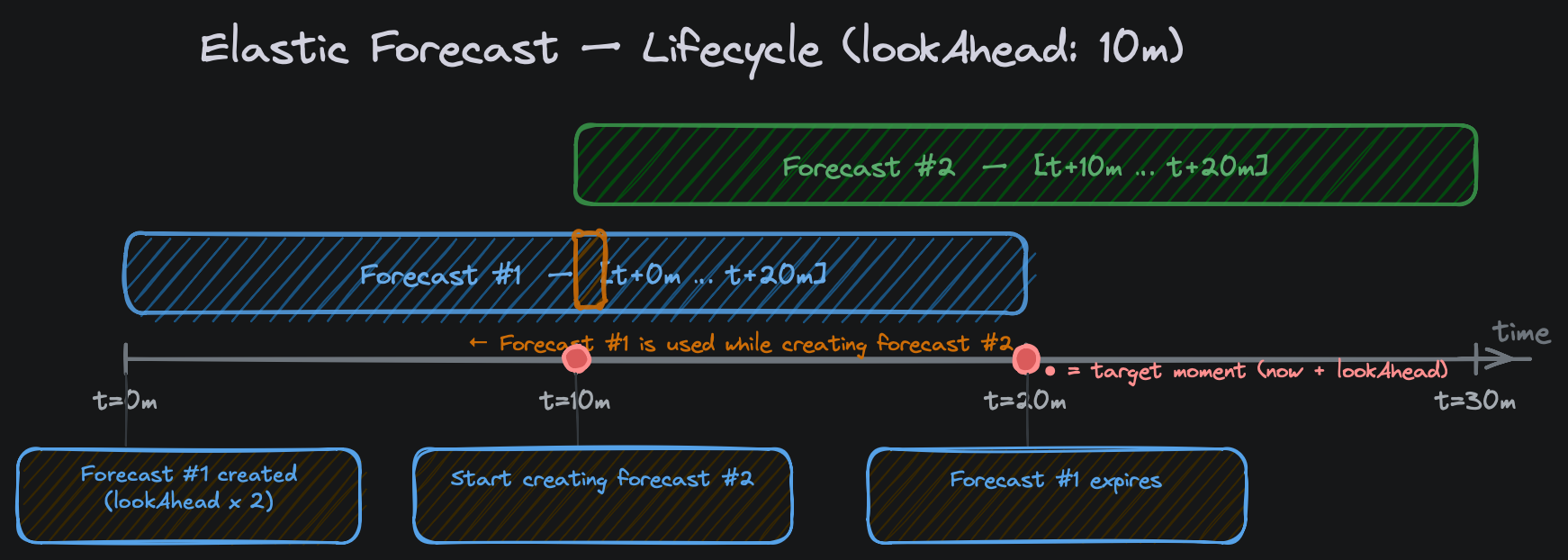
When the ScaledObject is deployed, the scaler calls the ML forecast API to create the first forecast. The forecast duration is set to 2 × lookAhead automatically, which keeps the target moment (now + lookAhead) within the covered window. The expires_in is set to the same value so Elasticsearch cleans the forecast documents automatically when they are no longer needed.
Note that forecast documents may still be visible after the
expires_inmoment, as Elasticsearch’s cleanup processes can run at intervals and do not remove expired documents instantaneously.
Forecasts are renewed automatically at the halfway point of their window (when lookAhead time remains). At renewal time the previous forecast is retained as a fallback while Elasticsearch computes the new forecast asynchronously, so there is no gap in scaling decisions.
The ML job must be in the opened state when the scaler runs. If the job is closed, the forecast API call will return an error.
Example with lookAhead: 10m:
| Time | Event |
|---|---|
| t=0m | First forecast created, covers [t+0m .. t+20m], target = t+10m |
| t=10m | Renewal triggered, new forecast covers [t+10m .. t+20m] |
| t=10m–t+10m30s | Previous forecast used as fallback while new one is indexed |
| t=20m | First forecast expires, Elasticsearch removes documents |
Elasticsearch rounds off the time. Therefore, a forecast may be slightly longer than requested.
Lifecycle Diagram
Prerequisites
- An Elasticsearch cluster with a valid Platinum or Enterprise licence (or an active trial), since ML features require a paid licence tier.
- A trained ML anomaly detection job with enough historical data to produce a reliable forecast. Elasticsearch ML requires approximately 48 or more result buckets before the model is considered stable enough to forecast.
- The ML job must be associated with a datafeed that has processed historical data.
- The ML job must be in the
openedstate when KEDA polls. If the job was closed after a bounded datafeed run, re-open it before deploying the ScaledObject. - The user requires authorization
manage_ml. See also here.
Multi-Metric Forecasts
Elasticsearch ML jobs can be configured with a by_field or partition_field in their detector, which causes the job to track and forecast a separate model for each unique value of that field. For example, a job with partition_field_name: “application” and by_field_name: “request_type” will produce individual forecasts per combination of application and request type. Without filtering, the scaler would match an arbitrary forecast document from the index.
Use byFieldValue and partitionFieldValue to scope the query to the specific series you want to scale on:
byFieldValue- matches theby_field_valueon the forecast document, used when the detector has aby_field_name.partitionFieldValue- matches thepartition_field_valueon the forecast document, used when the detector has apartition_field_name.
Both fields can be used simultaneously if the job uses both. If the job uses neither (a single-metric job), omit both fields.
Examples
Self-hosted cluster with password authentication and TriggerAuthentication:
apiVersion: v1
kind: Secret
metadata:
  name: elastic-forecast-secrets
type: Opaque
data:
  password: cGFzc3cwcmQh
---
apiVersion: keda.sh/v1alpha1
kind: TriggerAuthentication
metadata:
  name: keda-trigger-auth-elastic-forecast
spec:
  secretTargetRef:
  - parameter: password
    name: elastic-forecast-secrets
    key: password
---
apiVersion: keda.sh/v1alpha1
kind: ScaledObject
metadata:
  name: my-app-forecast-scaledobject
spec:
  scaleTargetRef:
    name: "my-app"
  minReplicaCount: 1
  maxReplicaCount: 10
  triggers:
    - type: elastic-forecast
      metadata:
        addresses: "http://elasticsearch:9200"
        username: "elastic"
        jobID: "my-throughput-job"
        lookAhead: "5m"
        targetValue: "1000"
      authenticationRef:
        name: keda-trigger-auth-elastic-forecast
Elastic Cloud with API key authentication:
apiVersion: v1
kind: Secret
metadata:
  name: elastic-cloud-forecast-secrets
type: Opaque
data:
  cloudID: "<base64-encoded-cloud-id>"
  apiKey: "<base64-encoded-api-key>"
---
apiVersion: keda.sh/v1alpha1
kind: TriggerAuthentication
metadata:
  name: keda-trigger-auth-elastic-cloud-forecast
spec:
  secretTargetRef:
  - parameter: cloudID
    name: elastic-cloud-forecast-secrets
    key: cloudID
  - parameter: apiKey
    name: elastic-cloud-forecast-secrets
    key: apiKey
---
apiVersion: keda.sh/v1alpha1
kind: ScaledObject
metadata:
  name: my-app-cloud-forecast-scaledobject
spec:
  scaleTargetRef:
    name: "my-app"
  minReplicaCount: 1
  maxReplicaCount: 20
  triggers:
    - type: elastic-forecast
      metadata:
        jobID: "my-throughput-job"
        lookAhead: "10m"
        targetValue: "500"
      authenticationRef:
        name: keda-trigger-auth-elastic-cloud-forecast
Multi-metric job with partition and by field filters:
triggers:
  - type: elastic-forecast
    metadata:
      addresses: "http://elasticsearch:9200"
      username: "elastic"
      jobID: "my-multi-metric-job"
      lookAhead: "5m"
      targetValue: "200"
      partitionFieldValue: "my-application"
      byFieldValue: "request"
    authenticationRef:
      name: keda-trigger-auth-elastic-forecast